Use Our IHSS Timesheet Generator

IHSS eTimesheet Planner Overview — IHSSConnect

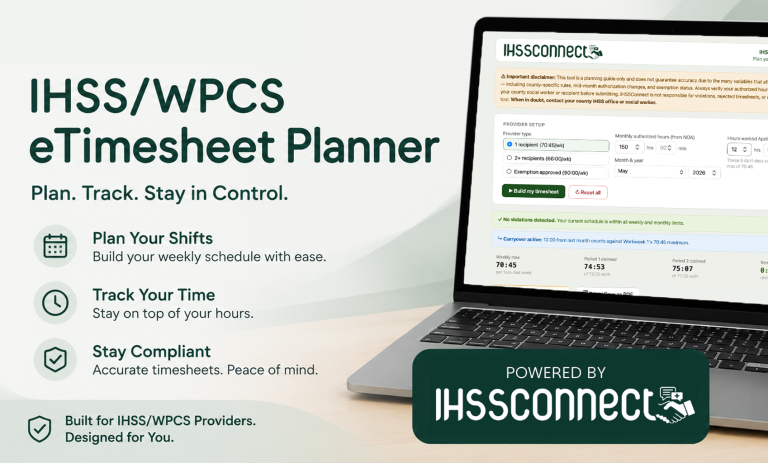
IHSSConnect tool

Stop guessing.
Start planning with confidence.

The IHSS eTimesheet Planner helps providers map out their hours before they ever open the state portal — so you submit correctly the first time, every time.

Two pay periods, clearly mapped

Automatically splits your month into Period 1 (days 1–15) and Period 2 (days 16–end), with exact submission deadlines shown.

Real-time violation detection

Weekly bars and alerts catch problems the moment they happen — before you submit and face a rejection or penalty.

Overtime hours tracked

Automatically tallies hours worked above 40 per week so you can see your overtime-eligible time at a glance.

Fully editable day by day

Click any day to adjust hours. The tool recalculates totals, weekly caps, and remaining authorized time instantly.

Exclude days from distribution

Block out any days you won’t work. The planner respects your availability and fills only the days you choose.

Month carryover handled

When the 1st falls mid-week, the tool accounts for prior-month days that share your Workweek 1 budget automatically.

Step 1

Enter your details

Select your provider type, monthly authorized hours from your NOA, and the month you’re planning.

Step 2

Build your timesheet

Hours are automatically distributed across all available days, respecting your weekly maximum.

Step 3

Adjust & exclude

Edit any day manually or exclude days you won’t work. Hit suggest to redistribute remaining hours.

Step 4

Print or reference

Save a PDF or keep the tool open while entering time in the eTimesheets portal.

Who is this for?

  • IHSS providers with one or more recipients
  • WPCS providers managing authorized hours
  • Family member caregivers with exemptions (up to 90 hrs/week)
  • Anyone who has ever had a timesheet rejected

The most common mistakes it prevents

  • Exceeding your weekly max in a week that crosses the 15th
  • Forgetting prior-month carryover days in Week 1
  • Uneven splits that leave authorized hours unclaimed

Period 1 — submit by the 15th

Days 1–15  ·  each week capped at your weekly max

30
31
1
2
3
4
5
6
7
8
9
10
11
12
13
14
15
Hours filled
Prev. month carryover
Excluded

Period 2 — submit by the last day

Days 16–31  ·  split week on the 15th tracked automatically

16
17
18
19
20
21
22
23
24
25
26
27
28
29
30
31
Hours filled
Excluded
This tool is a planning guide only. Always verify your authorized hours, weekly maximums, and any exemption status with your county social worker or recipient before submitting to the eTimesheets portal. When in doubt, contact your county IHSS office.
IHSS eTimesheet Planner
IHSS/WPCS eTimesheet PlannerPlan your pay periods & avoid violations
⚠ Disclaimer: This is a planning guide only. Always verify your authorized hours and weekly maximums with your county social worker or recipient before submitting. IHSSConnect is not responsible for rejected timesheets or violations.
Provider setup
Provider type
Max 360 hrs/month. Includes Family (Exemption 1) and Extraordinary Circumstances (Exemption 2).
Monthly authorized hours (from your NOA)
hrs min
Month & year
Hours worked in previous month (Workweek 1 carryover)
hrs min
Weekly max
Sun–Sat
Total claimed
0:00
of auth.
Period 1
0:00
of
Period 2
0:00
of
Remaining
unclaimed
Overtime
0:00
over 40 hrs/wk
Period 1 — submit on the 15th
0:00
of authorized
Su
Mo
Tu
We
Th
Fr
Sa
Period 2 — submit on last day
0:00
of authorized
Su
Mo
Tu
We
Th
Fr
Sa
Tips: Click any day to edit hours (HH:MM). Use the icon to exclude a day from distribution. Clear week zeros all days in a workweek. Suggest even distribution fills all empty, non-excluded days with remaining hours.

Frequently asked questions

What is the IHSS eTimesheet Planner and who is it for?

The IHSS eTimesheet Planner is a free browser-based tool built by IHSSConnect to help California IHSS and WPCS providers plan their monthly hours before submitting through the state’s eTimesheets portal at etimesheets.ihss.ca.gov. It’s designed for any provider who wants to avoid timesheet rejections, violations, or missed hours — whether you’re new to IHSS or have been doing this for years.

Where do I find my monthly authorized hours?

Your monthly authorized hours are listed on your Notice of Action (NOA) letter, which is mailed to you by your county IHSS office whenever your authorization is approved or updated. If you’ve misplaced your NOA, contact your county IHSS office or ask your recipient’s social worker — they can confirm the current authorized amount on file.

What is a pay period in IHSS, and why are there two per month?

IHSS divides each calendar month into two pay periods. Period 1 covers days 1 through 15, and your timesheet for that period must be submitted on or before the 15th. Period 2 covers day 16 through the last day of the month, and must be submitted on or before the last day. Submitting late can result in delayed payment or a rejected timesheet.

What is the weekly maximum and why does it matter?

Your weekly maximum is the most hours you can claim in any single Sunday-through-Saturday workweek, regardless of which pay period those days fall in. For providers with one recipient, the standard cap is 70 hours and 45 minutes per week. Providers with two or more recipients are capped at 66 hours per week. Providers with an approved exemption — such as a live-in family member (Exemption 1) or extraordinary circumstances (Exemption 2) — may work up to 90 hours per week, up to a maximum of 360 hours per month. The eTimesheets portal will automatically reject any timesheet that exceeds your weekly cap, so planning ahead is essential.

What is a “split week” and why is it the most common source of errors?

A split week happens when a Sunday-through-Saturday workweek crosses the 15th of the month — meaning some days fall in Period 1 and some fall in Period 2. Your weekly maximum applies to the entire week combined, across both periods. Many providers unknowingly enter their full authorized hours into Period 1 for those days, then try to enter more hours for the same week in Period 2, which pushes them over their weekly cap and triggers a rejection. The planner automatically identifies split weeks and distributes hours correctly across both periods.

What is a “carryover week” and does it affect my timesheet?

A carryover week occurs when the first day of the month doesn’t fall on a Sunday. In that case, the days before the 1st from the previous month share a workweek with the new month’s first few days. Hours you worked during those previous-month days count toward the weekly maximum for your first workweek of the new month. If you worked a full week at the end of last month and the new month starts mid-week, you may have little to no remaining weekly budget for the first few days of the new period. The tool accounts for this when you enter prior-month hours in the carryover field.

What’s the difference between “Build my timesheet” and “Suggest even distribution”?

“Build my timesheet” runs when you first set up the tool and fills all available days from scratch using all of your monthly authorized hours. “Suggest even distribution” is for after you’ve made manual changes — it looks at which days currently have zero hours entered (and aren’t excluded), calculates how many authorized hours remain unclaimed, and distributes only those remaining hours across the empty days. This lets you lock in specific hours on certain days and then let the tool handle the rest.

Is this tool officially affiliated with the California Department of Social Services or my county IHSS office?

No. The IHSS eTimesheet Planner is an independent tool built by IHSS Connect to help providers navigate the timesheet process more confidently. It is not affiliated with, endorsed by, or connected to the California Department of Social Services (CDSS), any county IHSS office, or the eTimesheets portal. This tool is a planning guide only. Always verify your authorized hours and any questions about your specific situation with your county social worker or recipient before submitting your timesheet.

What if my situation doesn’t fit the standard provider types listed?

Select “Custom weekly max” from the provider type options. This lets you manually enter any weekly maximum in hours and minutes — useful for situations where your county, exemption status, or authorization arrangement results in a cap that doesn’t match the standard tiers. If you’re unsure what your weekly maximum should be, contact your county IHSS office or social worker.

Share

Next Story

What Is an IEP—and How It Wields More Power Than Parents Realize

If you’ve ever heard the term “IEP” thrown around in school meetings, Facebook groups, or doctor’s offices and felt unsure...

IHSS Pay rates by County in California — 2026 Updated

IHSS caregiver pay rates range from $16.90/hr (Siskiyou) to $23.00/hr (San Francisco) in 2026. See the full table of all...

How to Become or Reactivate as an IHSS Provider in California — And Get Paid Faster

For many caregivers, the path into In-Home Supportive Services (IHSS) isn’t always linear. You might already be approved in one...