If you’re an IHSS provider or recipient, you’ve probably run into the letters “ESP” — in a text from the county, in a training video link, or on hold with a help desk. It isn’t a mysterious third agency. It’s the website that runs IHSS timesheets and provider pay, and it’s the same portal for everyone in the program statewide.
This piece walks through what the ESP actually does, why California requires it, the difference between how live-in and non-live-in providers use it, and where to get help if something isn’t working.
What ESP Stands For, and What It Does
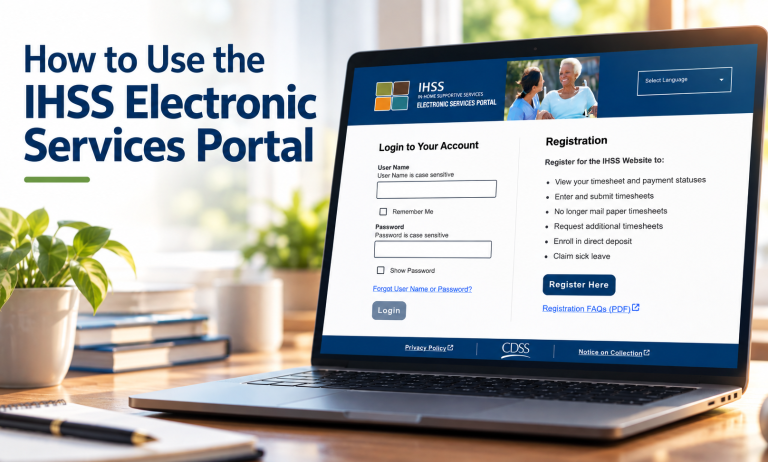
ESP stands for Electronic Services Portal. It’s the website at etimesheets.ihss.ca.gov, run by the California Department of Social Services (CDSS), and both providers and recipients log into the same site — just with different accounts and different things to do.
For providers, the ESP is where you:
- Complete and submit electronic timesheets
- View payment status and payment history
- Sign up for Direct Deposit or change your existing account
- Submit a Sick Leave claim
- Switch to paperless pay stubs
For recipients, the ESP is where you review and approve — or reject — your provider’s electronic timesheet each pay period.
Why the Portal Exists: the EVV Law Behind It
The ESP exists because of a federal requirement, not a CDSS preference. Section 12006 of the 21st Century Cures Act added a provision to the Social Security Act requiring every state to use an Electronic Visit Verification (EVV) system for Medicaid-funded personal care and home health services that involve an in-home visit — which includes IHSS. States had to have EVV in place for personal care services by January 1, 2020, and California implemented the requirement between 2019 and 2021, county by county.
In practice, EVV just means the timesheet has to be built through a system CDSS designates — the ESP, the Telephone Timesheet System (TTS), or the IHSS EVV Mobile App — rather than filled out on paper. CDSS is explicit that the EVV requirement itself doesn’t touch eligibility or hours:
Live-In vs. Non-Live-In: What Changes in the ESP
The ESP works differently depending on whether a provider lives with the recipient they work for.
Live-in providers
A provider who lives in the same home as their recipient can self-certify that fact by submitting form SOC 2298. Once that’s on file, they aren’t required to check in and out with location information — they just enter their hours.
Non-live-in providers
Providers who don’t live with their recipient are required to check in and out at the start and end of every workday, and to indicate whether the service happened in the recipient’s home or in the community. That check-in/check-out can be done through the ESP, through TTS on the recipient’s landline, or through the EVV mobile app. Once it’s entered, it populates the electronic timesheet automatically.
If You Don't Have a Computer or Smartphone
The ESP isn’t the only way to meet the EVV requirement. The Telephone Timesheet System (TTS) lets providers and recipients handle timesheets, including check-in/check-out, from the recipient’s landline — no email or internet access required. Recipients using TTS to approve timesheets call 1-833-342-5388 to get set up.
How to Register for the ESP
- Go to etimesheets.ihss.ca.gov.
- Select “Register Here” and follow the prompts.
- Have your Provider or Recipient number, Social Security number, and a valid email address ready — registration asks for all three.
- If you get stuck on a one-time passcode or a password reset, CDSS publishes step-by-step guides for both, in multiple languages, linked in the Sources section below.
- Go to etimesheets.ihss.ca.gov.
- Select "Register Here" and follow the prompts.
- Have your Provider or Recipient number, Social Security number, and a valid email address ready — registration asks for all three.
- Stuck on a one-time passcode or password reset? CDSS publishes step-by-step guides for both — see Sources below.
Getting Help
The IHSS Service Desk handles both ESP account issues and general timesheet questions for providers and recipients statewide: (866) 376-7066, Monday through Friday, 8 a.m. to 5 p.m., excluding major holidays.
Report suspected IHSS fraud to the state fraud hotline at 888-717-8302, or provider fraud and elder abuse to 1-(800)-722-0432.
Need help with your ESP account?
- IHSS Service Desk: (866) 376-7066 — Mon–Fri, 8am–5pm, excluding holidays
- TTS registration (recipients): 1-833-342-5388
- Suspected fraud: 888-717-8302
About This Article
IHSS Connect publishes this article for general information and education. It is not legal advice, and reading it does not create an attorney–client relationship. IHSS Connect is not a law firm and is not affiliated with the California Department of Social Services or any county agency.
Program details, phone numbers, and web addresses can change. Only CDSS, your county IHSS office, or the IHSS Service Desk can resolve an issue with your specific ESP account or timesheet.
If a decision on your case looks wrong, or you want advice about your own situation:
- Free and low-cost legal help: LawHelpCA.org
- IHSS Service Desk: (866) 376-7066
- CDSS Public Inquiry and Response: 1-800-952-5253
Verified against CDSS primary sources, September 2026.
Sources
Sources
- CDSS — Electronic Services Portal — ESP registration steps, provider/recipient features, Service Desk contact
- CDSS — Electronic Visit Verification (EVV) for Recipients and Providers — EVV legal framing, live-in self-certification (SOC 2298), non-live-in check-in/out rules, fraud hotline numbers
- Medicaid.gov — Electronic Visit Verification — Section 12006 of the 21st Century Cures Act, the federal EVV mandate and compliance deadlines
- County of Los Angeles DPSS — IHSS Timesheets/EVV for Recipients and Providers — TTS registration phone number for recipients approving timesheets by telephone
CDSS is the primary authority throughout. Where a county page and CDSS's own EVV guidance differ, CDSS's statewide guidance governs.